Our verdict — 8.8/10. HubSpot is the CRM teams actually use. The interface is the best in the category, the free plan is genuinely usable rather than a trial in disguise, and the marketing automation is the strongest of any mainstream CRM. The catch is money: the jump from Starter to Professional is steep, Marketing Hub pricing scales with contacts you may not even email, and most Professional plans carry annual commitments and one-off onboarding fees. Buy it if adoption and marketing matter more than raw cost. Skip it if you need deep customization on a tight budget — that's Zoho.
HubSpot started life in 2006 as an inbound-marketing tool and has since grown into a full customer platform: a CRM at the center, with Marketing, Sales, Customer Service, CMS, Commerce and Operations "Hubs" bolted around it, plus a growing layer of AI (branded Breeze) running through all of them. That breadth is the whole point — HubSpot's pitch is that your contact record, your email campaigns, your sales pipeline and your support tickets all share one database, so nothing falls through the cracks.
This review is written for the people who actually have to make the call: founders, startups, agencies, SaaS companies, SMBs and growing businesses weighing HubSpot against Salesforce, Zoho, Pipedrive and a dozen others. By the end you'll know whether HubSpot fits, which plan you actually need, what it costs once the discounts wear off, and which alternative to pick if it doesn't.
Quick verdict
| Quick verdict | At a glance |
|---|---|
| Overall rating | ⭐ 8.8 / 10 |
| Best for | Marketing-led SMBs, startups and agencies that value ease of use |
| Starting price | Free forever · paid from ~$15/seat/mo (Starter) |
| Free plan | Yes — genuinely usable, unlimited users |
| AI features | Strong — Breeze AI across email, content, prospecting and reporting |
| Ease of use | Best-in-class — the reason teams adopt it |
| Customer support | Good on paid tiers; free tier is community/docs only |
| Value for money | Excellent at Free/Starter, questionable at Professional+ |
| ChooseMyStack recommendation | ✅ Recommended — start free, but price the tier you'll need in a year before you commit |
💡 Pro tip: HubSpot's real cost is never the tier you sign up on — it's the tier you grow into. Model your price at 12 months of contact growth and headcount before you fall in love with the free plan.
Who HubSpot is best for
HubSpot rewards teams whose growth is marketing-led and relationship-driven, and who care more about a tool people will actually keep updated than about squeezing every last feature out of a low price.
- Startups — The free CRM plus Starter is one of the best-value ways to get organized before you have revenue. HubSpot for Startups also offers 30–90% discounts for eligible early-stage companies (via partner accelerators and VCs), which softens the notorious jump to paid tiers. Why it fits: you get a real CRM, forms, email and live chat without a specialist admin.
- SaaS companies — Native product-led motions, lifecycle stages, and clean handoffs between marketing, sales and success map neatly onto how SaaS teams operate. Why it fits: one timeline per account, from first touch to renewal.
- Agencies — HubSpot's Solutions Partner program, multi-client reporting and marketing tooling make it a default for agencies that manage campaigns on behalf of clients. Why it fits: the marketing automation and reporting are genuinely best-in-class, and you can resell.
- Sales teams — Sequences, a clean pipeline, call logging, meeting links and forecasting give reps a low-friction place to work. Why it fits: adoption. An unused CRM is worthless, and reps actually use this one.
- Marketing teams — This is HubSpot's home turf. The workflow builder, email tooling, landing pages, forms and attribution reporting are the strongest of any mainstream CRM. Why it fits: you can run a whole demand-gen engine without stitching five tools together.
- Growing businesses — Because everything sits on one contact record, HubSpot scales from a solo founder to a 200-person company without a re-platform. Why it fits: you buy capability as you need it, hub by hub.
Who should avoid HubSpot
HubSpot is not the right answer for everyone, and it's expensive to discover that after you've migrated. Walk away — or think hard — if you're in one of these situations.
- Very small budgets that need paid features. The free tier is superb, but the moment you need automation, the Professional jump is severe. If you need workflows and you're counting every dollar, Zoho CRM delivers more features per dollar. → See our Zoho CRM review.
- Enterprise ERP or heavy back-office needs. HubSpot is a front-office customer platform, not an ERP. If you need deep manufacturing, inventory or finance workflows, look at Salesforce plus specialist systems.
- You want an extremely simple, cheap CRM. If your sales motion is just "track deals through a pipeline," Pipedrive is simpler and cheaper and you won't miss the rest.
- You only need contact storage. If you genuinely just want a shared address book, a spreadsheet or a free Notion database will do — don't pay for a platform.
Skip it if: deep, unusual customization on a tight budget is your top priority. HubSpot is opinionated by design; Zoho and Salesforce bend further.
ChooseMyStack score
Our scores are a single expert editorial assessment based on the methodology described below — not an aggregate of user star ratings. Each dimension is scored out of 10.
| Category | Score | Why |
|---|---|---|
| Ease of use | 9.5 | The most intuitive mainstream CRM; minimal training needed |
| CRM core | 8.8 | Excellent contact/company/deal model; less customizable than Zoho/Salesforce |
| AI (Breeze) | 8.6 | Genuinely useful drafting, summarizing and prospecting; still maturing |
| Automation | 8.7 | Powerful visual workflows; the best features are gated to Professional+ |
| Marketing | 9.4 | Best-in-class email, landing pages, forms and attribution |
| Reporting | 8.5 | Polished dashboards out of the box; custom reporting needs higher tiers |
| Integrations | 9.2 | 1,700+ marketplace apps; deep native ties to Gmail, Slack, Shopify, Stripe |
| Customer support | 8.4 | Strong on paid tiers; free users rely on docs and community |
| Pricing / value | 7.6 | Unbeatable at Free/Starter; expensive and contact-metered above that |
| Scalability | 9.0 | Grows from solo founder to mid-market on one platform |
| Overall | 8.8 / 10 | A superb, adoption-friendly platform whose only real weakness is cost escalation |
Pros and cons
| Pros | Cons |
|---|---|
| Genuinely usable free CRM with unlimited users | Steep price jump from Starter to Professional |
| Best-in-class ease of use and onboarding | Marketing Hub bills by marketing contacts, not just seats |
| Strongest marketing automation in the category | Higher tiers add onboarding fees and annual contracts |
| One shared contact record across all Hubs | Less deeply customizable than Zoho or Salesforce |
| Huge integration marketplace (1,700+ apps) | Advanced reporting and workflows gated behind Pro+ |
| Useful, expanding Breeze AI across the platform | Costs can surprise you if you don't model growth |
| Scales from founder to mid-market without re-platforming | Overkill (and overpriced) for simple pipeline-only needs |
The honest trade-off: HubSpot sells adoption and marketing power, and charges for it. You're paying a premium for a tool your team will actually keep current — which, for many businesses, is worth more than a cheaper CRM nobody updates.
Pricing snapshot
HubSpot is sold either as individual Hubs (Marketing, Sales, Service, Content, Commerce, Operations) or as a bundled Customer Platform. Prices below are approximate 2026 figures in USD and change frequently — always confirm on HubSpot's official pricing page, and note that pricing and available plans vary by region.
| Plan | Approx. price | Who it's for |
|---|---|---|
| Free | $0 · unlimited users | Solo founders and small teams getting organized |
| Starter | from ~$15/seat/mo | Small teams that need light automation, email and pipelines |
| Professional | from ~$90/seat/mo (Sales) · Marketing Hub Pro ~$800+/mo | Growing teams that need serious automation and reporting |
| Enterprise | from ~$150/seat/mo (Sales) · Marketing Hub Ent. ~$3,600+/mo | Larger orgs needing advanced controls, custom objects and governance |
Hidden costs to watch:
- Marketing contacts. Marketing Hub bills by the number of marketing contacts you email — a large list raises the price even if engagement is flat. Non-marketing contacts are free, so segment carefully.
- Onboarding fees. Professional plans often carry a one-off onboarding fee (roughly $1,500 for Marketing Hub Pro, higher for Enterprise). These are sometimes waivable through a partner.
- Annual commitments. The best pricing usually requires an annual contract; monthly billing costs more.
- Add-on seats and Breeze credits. Extra paid seats and some AI features consume credits or cost extra at scale.
💡 Pro tip: If you're a startup, check eligibility for HubSpot for Startups before you pay list price — the 30–90% discount can make Professional affordable in your first two years.
How we evaluated
We want to be transparent about what this review is and isn't. We did not run a controlled 90-day enterprise deployment. Instead, this assessment combines hands-on use of HubSpot's free and Starter tiers, HubSpot's official documentation and demos for paywalled features, aggregated feedback from reputable review platforms (G2, Capterra and others) read critically, and direct comparison against the rival CRMs we've reviewed. Our rating is a single editorial opinion — never a fabricated average of user reviews — and where a claim depends on a plan we couldn't fully test, we say so.
HubSpot at a glance
| Attribute | Detail |
|---|---|
| Founded | 2006 |
| Headquarters | Cambridge, Massachusetts, USA |
| Best for | Marketing-led SMBs, startups, agencies |
| Deployment | Cloud (SaaS) |
| Platforms | Web, plus native mobile apps |
| Mobile apps | iOS and Android |
| AI | Breeze — AI assistant, content, prospecting and reporting |
| Automation | Visual workflow builder, sequences, lead routing |
| Integrations | 1,700+ in the App Marketplace, plus open APIs |
| Support | Docs + community (free); email, chat and phone on paid tiers |
| Free trial | Free plan forever; paid tiers offer trials/demos |
Video walkthrough
If you'd rather see the interface in motion before signing up, this independent walkthrough covers the free CRM's features, pros and cons.
AI features (Breeze)
HubSpot bundles its AI under the Breeze brand, and unlike some rivals it's woven through the product rather than bolted on as a separate chatbot. It's genuinely useful today, though still maturing.
AI email writing
Breeze drafts and rewrites sales and marketing emails from a short prompt or the context of a contact record. Strength: good first drafts that cut writing time noticeably. Weakness: output still needs a human edit to avoid a generic tone. Use case: speeding up rep follow-ups and campaign variants.
AI content
Inside the content and blog tools, Breeze can generate outlines, paragraphs and landing-page copy. Strength: helpful for beating the blank page. Weakness: not a substitute for a real content strategy — treat it as an assistant.
AI assistant
A conversational assistant summarizes records, answers "what's the status of this deal," and drafts on request. Strength: reduces clicking around a record. Weakness: most valuable when your data is already clean.
AI reporting
Breeze can turn a plain-English question ("show me deals closing this quarter by owner") into a report or chart. Strength: lowers the barrier to reporting for non-analysts. Weakness: complex custom analysis still needs the manual report builder.
AI prospecting
Breeze Prospecting Agent and related tools research accounts and suggest outreach, edging HubSpot toward the "AI SDR" territory rivals like Clay and Apollo occupy. Strength: promising for top-of-funnel research. Weakness: newer and best treated as an assist, not autopilot.
Verdict on AI: Breeze is one of the better native CRM AI layers — practical, integrated and improving fast. It won't replace a specialist prospecting stack, but for most SMBs it removes real busywork.
Automation
Automation is where HubSpot separates from simpler CRMs — and where the price jump lives, since the best tools are Professional+.
- Workflow builder — a visual, branching canvas for enroll-trigger → conditions → actions. It's powerful and approachable; marketers build serious automations without code.
- Lead routing — automatically assign leads to owners by territory, round-robin or custom rules.
- Sequences — automated, personalized email/task series for sales outreach (Sales Hub).
- Triggers — enroll contacts based on form submissions, page views, property changes, list membership and more.
- Automation limits — the number of active workflows and some advanced actions scale with your tier; the free and Starter plans offer only light automation.
💡 Pro tip: Map the two or three automations you can't live without, then check which tier includes them. That single question usually decides Starter vs Professional.
CRM (contact, company and deal management)
The CRM is the free foundation everything else sits on, and it's excellent.
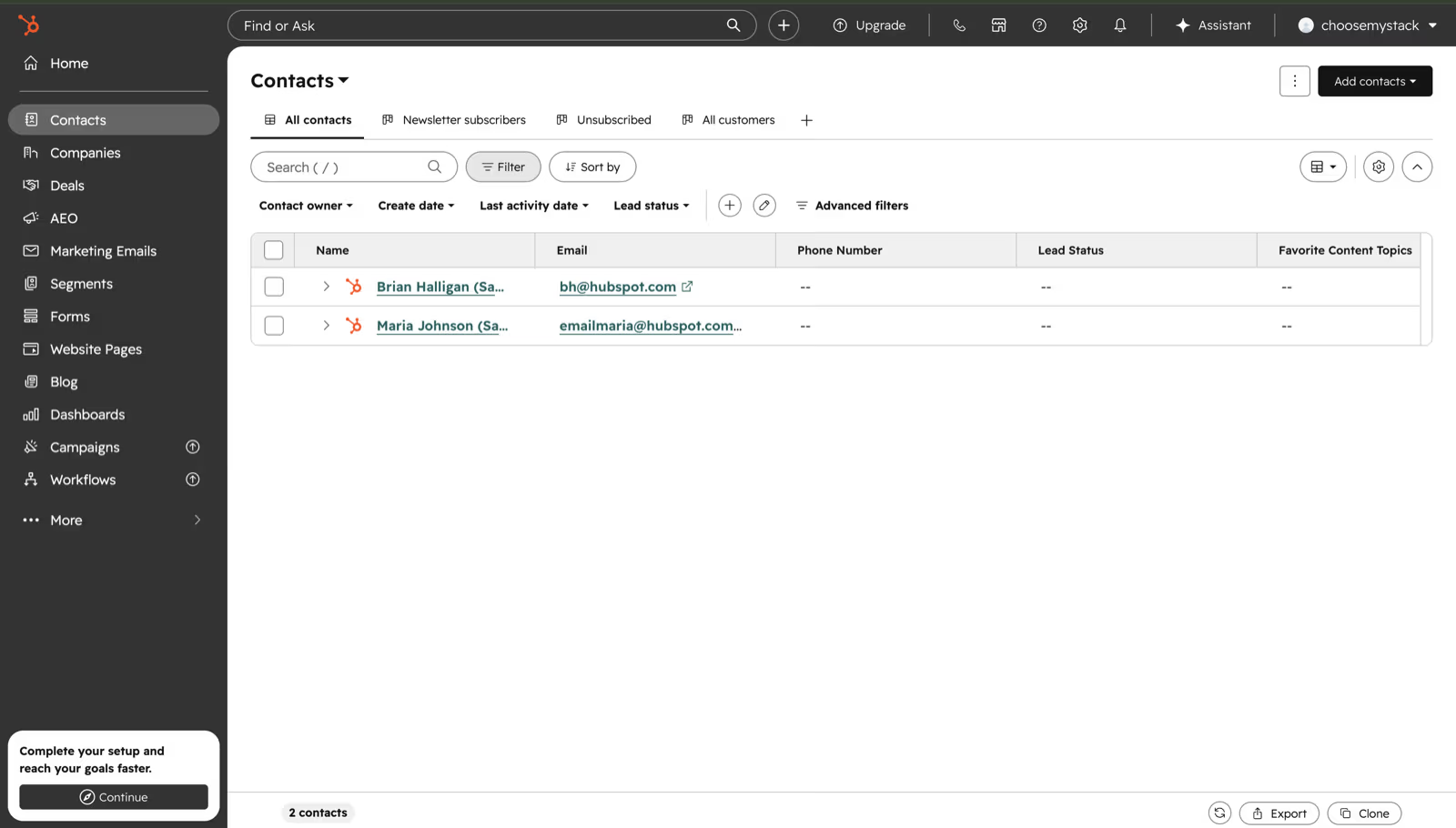
- Contact management — rich contact records with a unified timeline of every email, call, note and meeting. Enrichment fills in company details automatically.
- Companies — contacts associate to company records, so you see the whole account at a glance.
- Deals — deals move through customizable pipeline stages with amounts, close dates and probability.
- Pipelines — drag-and-drop boards; multiple pipelines on paid tiers for different sales motions.
- Lead scoring — rules-based (and, higher up, AI-assisted predictive) scoring to prioritize the right contacts.
The model is clean and opinionated. You won't get Zoho's or Salesforce's infinite custom-object depth on lower tiers, but for the vast majority of SMB sales processes, HubSpot's defaults are more than enough — and far easier to keep tidy.
Marketing Hub
Marketing Hub is the strongest part of the platform and the main reason marketing teams pick HubSpot.
- Email marketing — a drag-and-drop builder, smart send times, A/B testing and personalization tokens tied to CRM data.
- Landing pages — build and publish campaign pages without a developer.
- Forms — native forms and pop-ups that write straight to the CRM and trigger workflows.
- Campaigns — group assets under a campaign and measure them together.
- Analytics — multi-touch attribution and campaign reporting that connect marketing spend to pipeline.
Because the marketing tools share the CRM's contact record, you get closed-loop reporting — which campaign produced which closed deal — that stitched-together tool stacks struggle to match.
Sales Hub
- Pipelines — the deal boards above, with forecasting on top.
- Meeting scheduler — shareable booking links that sync to your calendar (a genuinely popular feature).
- Quotes — generate and send quotes, with e-signature and payment collection on higher tiers.
- Sequences — automated outreach cadences for reps.
- Forecasting — pipeline and revenue forecasting, stronger on Professional and Enterprise.
Sales Hub is very good, though outbound-heavy teams that live in cold email sometimes prefer a dedicated sales-engagement tool alongside it.
Customer Service Hub
- Ticketing — support requests as tickets on their own pipeline, tied to the same contact record.
- Live chat — website chat that routes to reps or bots.
- Help desk — a unified agent workspace on higher tiers.
- Knowledge base — self-serve articles to deflect tickets.
- Customer portal — a logged-in space where customers track their tickets.
Service Hub is capable and, crucially, shares data with sales and marketing — so support history informs renewals. It's not as deep as a dedicated Zendesk for high-volume support centers, but for most SMBs it's plenty.
Content Hub & Commerce Hub
Two newer, more peripheral Hubs round out the platform. Content Hub is a hosted CMS with a drag-and-drop website builder, blogging, built-in SEO and dynamic content — a legitimate option if you want your marketing site and CRM under one roof, though developers who want full control may still prefer a headless stack. Commerce Hub handles native payments (US-centric today), quotes, invoices and simple subscriptions; it's fine for straightforward billing, but complex subscription businesses will still reach for Stripe Billing.
Reporting
Out of the box, HubSpot's dashboards are among the most polished in the category — sales, marketing and service reporting that non-analysts can actually read. Attribution ties revenue back to campaigns, and forecasting projects pipeline. The limitation is depth: truly custom reports and larger dashboard counts are gated to Professional and Enterprise, and heavy BI needs may still push you toward an external warehouse.
Integrations
The App Marketplace is a real strength, with 1,700+ integrations and open APIs.
| Integration | What it does |
|---|---|
| Gmail / Google Workspace | Two-way email sync, calendar and meeting links |
| Slack | Deal and ticket notifications, workflow actions |
| Zapier | Connect HubSpot to thousands of apps without code |
| Shopify | Sync customers and orders for ecommerce marketing |
| Stripe | Payments and subscription data on the contact record |
For anything not natively supported, the API and Zapier fill the gaps. Few SMB CRMs match this ecosystem.
Ease of use
This is HubSpot's signature. A non-technical founder can create a pipeline, import contacts and send a first email on day one without a consultant. The information architecture is consistent, empty states guide you, and the setup checklist keeps momentum. If "will my team actually use it?" is your worry, HubSpot is the safest answer in this market.
Implementation time
Expect the free CRM to be productive within a day. Layering on Marketing or Sales Hub Professional — with workflows, lead scoring, templates and reporting — is a multi-week project, and HubSpot's onboarding fee exists precisely because most teams benefit from guided setup here. Budget realistically: the software is easy, but designing good automation and clean data always takes time.
Customer support test
| Channel | Availability |
|---|---|
| Email / ticket | Paid tiers |
| Chat | Paid tiers |
| Phone | Professional and Enterprise |
| Documentation | Excellent, free — HubSpot Academy is a genuine asset |
| Community | Large, active user community |
Support quality on paid tiers is well-regarded. The catch: free users get docs and community only, so factor that in if you're relying on the no-cost plan for anything mission-critical. HubSpot Academy, however, is one of the best free learning resources in SaaS.
Security
- Encryption — data encrypted in transit and at rest.
- Compliance — SOC 2 Type II; GDPR-aligned tooling for consent and data requests.
- GDPR — built-in features for lawful-basis tracking, subscription types and deletion.
- SSO — single sign-on (SAML) on higher tiers.
- Permissions — role- and team-based permissions, more granular on Enterprise.
For SMB and mid-market needs, HubSpot's security posture is solid. Regulated enterprises should confirm specific certifications and data-residency options for their region during evaluation.
What real users say
Our own testing isn't the only evidence worth weighing, so we went looking for unfiltered opinion. The pattern in user communities is consistent — the complaints are rarely about capability. They're about cost escalation and add-on sprawl, the same weakness our scoring flags.
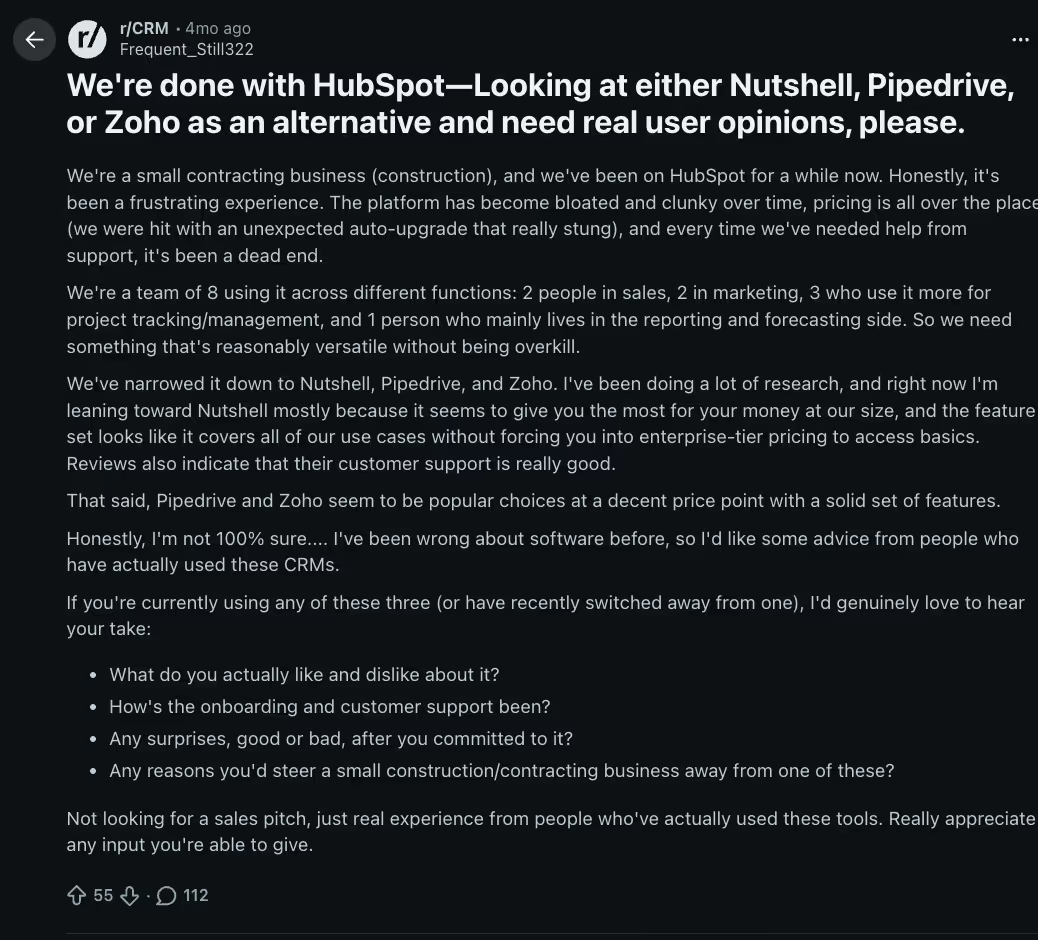
In an r/CRM thread titled "We're done with HubSpot — Looking at either Nutshell, Pipedrive, or Zoho" (55 upvotes, 112 comments), a small construction business describes the platform as having "become bloated and clunky over time," with pricing "all over the place" — including an unexpected auto-upgrade that stung — and support that felt like "a dead end." The top reply steers them toward Nutshell for hitting the "sweet spot" of comprehensive features at affordable pricing.
A separate r/startups thread, "Is Hubspot actually worth it?" (71 upvotes, 116 comments), captures the pricing complaint even more sharply. The original poster — a newly funded startup on a 90% first-year discount — found HubSpot "poorly organized" and "terribly expensive with add-ons," needing five separate packages (Sales Pro, prospecting, Operations Hub, Marketing, and branding removal) just to cover basic tasks. One commenter with the same 90%-off startup deal warned that after year one "our bill skyrocketed," and that they used "about 5% of the bells and whistles." Others recommended lighter combinations like Attio plus Apollo at a fraction of the cost.
Balance matters here. Reddit self-selects for frustration — people rarely post to say their CRM works fine, and the sharpest threads come from teams who outgrew the free plan and got surprised by the Professional jump, which is exactly the risk this review keeps flagging. On aggregate review platforms the picture is warmer: G2 and Capterra both land around 4.4/5 across thousands of reviews, with praise clustering on ease of use, onboarding and the free plan — and criticism clustering, predictably, on cost. The takeaway isn't "don't buy HubSpot." It's model the tier you'll grow into before you commit, and mark non-emailed contacts as non-marketing to keep Marketing Hub billing under control.
HubSpot vs competitors
| Matchup | Short verdict |
|---|---|
| HubSpot vs Salesforce | Salesforce is deeper and more customizable for enterprise; HubSpot is far easier to adopt and cheaper to run for SMBs. |
| HubSpot vs Zoho CRM | Zoho wins on price and customization; HubSpot wins on ease of use, free plan and marketing. → Full comparison |
| HubSpot vs Pipedrive | Pipedrive is a simpler, cheaper sales-only pipeline; HubSpot is a whole platform. Pick Pipedrive if you only want deal tracking. |
| HubSpot vs Freshsales | Freshsales is a strong-value sales CRM with built-in AI; HubSpot's edge is marketing depth and ecosystem. |
| HubSpot vs Monday CRM | Monday CRM is a flexible, visual Work-OS CRM; HubSpot is the more complete marketing-and-sales platform. |
| HubSpot vs Close | Close is built for high-volume outbound calling/emailing teams; HubSpot is broader but less specialized for cold outreach. |
| HubSpot vs Attio | Attio is a modern, highly customizable relationship CRM loved by startups; HubSpot brings marketing automation Attio doesn't. |
Browse all head-to-heads on our comparisons hub.
HubSpot alternatives
| Scenario | Best pick | Why |
|---|---|---|
| Best budget option | Zoho CRM | The most features per dollar; scales affordably |
| Best AI CRM | HubSpot (Breeze) / Freshsales | Native, practical AI across the workflow |
| Best startup CRM | HubSpot / Attio | Free-to-grow, or modern and flexible |
| Best enterprise CRM | Salesforce | Deepest customization and governance |
| Best sales CRM | Pipedrive / Close | Simple pipelines / outbound firepower |
| Best marketing CRM | HubSpot | Category-leading marketing automation |
Not sure where to start? Our best CRM for startups guide and how to choose a CRM walk you through it.
Pricing comparison
Approximate entry paid pricing (USD, verify current figures with each vendor):
| CRM | Free plan | Entry paid | Notes |
|---|---|---|---|
| HubSpot | Yes (unlimited users) | ~$15/seat/mo | Pro jump is steep; marketing bills by contacts |
| Zoho CRM | Yes (3 users) | ~$14/user/mo | Stays affordable at scale |
| Pipedrive | No | ~$14/seat/mo | Sales-only, simple |
| Salesforce | No | ~$25/user/mo (Starter) | Escalates fast with add-ons |
| Freshsales | Yes (limited) | ~$9/user/mo | Strong value, built-in AI |
Feature comparison
| Feature | HubSpot | Zoho CRM | Pipedrive | Salesforce |
|---|---|---|---|---|
| CRM core | Excellent | Excellent | Good (sales) | Excellent |
| AI | Strong (Breeze) | Good (Zia) | Basic | Strong (Einstein) |
| Automation | Excellent (Pro+) | Excellent | Good | Excellent |
| Marketing | Best-in-class | Good | Limited | Add-on |
| Reporting | Very good | Very good | Good | Excellent |
| Support | Good (paid) | Mixed | Good | Good (paid) |
| Mobile | Very good | Good | Good | Good |
| Integrations | Excellent (1,700+) | Good | Good | Excellent |
Migration guide
Moving to HubSpot is well-trodden. The import itself is easy; rebuilding your process is the real work.
What to migrate:
- Contacts and companies — export to CSV and use HubSpot's guided import; map fields carefully.
- Deals — import open deals with stage, amount and close date; align your old stages to new pipeline stages first.
- Emails — connect Gmail/Outlook for two-way sync so historical and future email logs onto records.
- Automations — these don't transfer. Rebuild your key workflows natively (a chance to clean them up).
Common migration mistakes:
- Importing dirty data — dedupe and standardize before you import, not after.
- Recreating every legacy field — start lean; add custom properties only when needed.
- Forgetting marketing-contact status — mark non-emailed contacts as non-marketing to control cost.
- Big-bang cutover — run a short parallel period and train the team before switching fully.
Best practice: migrate at a clean boundary (start of a quarter), pilot with one team, and use HubSpot Academy plus a Solutions Partner if your setup is complex.
Frequently asked questions
Is HubSpot worth it in 2026?
Is HubSpot CRM really free?
How much does HubSpot actually cost?
What is HubSpot best used for?
Is HubSpot good for startups?
What are the main downsides of HubSpot?
Final verdict
Score: 8.8/10. Recommended — with eyes open on cost.
HubSpot earns its reputation. Its strengths — the easiest adoption in the category, a genuinely usable free plan, and marketing automation nothing mainstream matches — make it the safest choice for marketing-led SMBs, startups and agencies. Its weaknesses are almost entirely about money: a steep Starter-to-Professional cliff, contact-based marketing billing, and onboarding fees on higher tiers.
Who should buy it: founders, startups, agencies, SaaS and growing businesses that value ease of use and marketing power, and who model the tier they'll grow into. Who shouldn't: teams needing deep customization on a tight budget (choose Zoho), a simple cheap pipeline (Pipedrive), or heavy enterprise/ERP depth (Salesforce).
Start on the free plan today, and before you upgrade, put HubSpot head-to-head with the alternatives on the specifics that matter to your business.
→ Compare HubSpot with other CRMs on ChooseMyStack: best CRM for startups · HubSpot vs Zoho CRM · all comparisons