Our verdict — 4.3/5. Zoho CRM is the best-value CRM on the market. For roughly $14–$40 per user it delivers customization, automation and reporting that rivals charge two to five times more for, and it plugs into a suite of 40+ business apps. The catch is the experience: the interface is dense, setup takes real effort, and support can be inconsistent. Buy it if budget matters and you want maximum capability per dollar. Skip it if your priority is a tool your team adopts on day one with zero training — that's HubSpot.
| Rating | 4.3 / 5 |
| Best for | Cost-conscious SMBs and teams with unusual sales processes |
| Starting price | Free (up to 3 users) · paid from ~$14/user/mo |
| Standout | Features per dollar, deep customization, Zoho One suite |
| Weakest point | Busy interface and a real learning curve |
| Try it | zoho.com/crm |
What is Zoho CRM?
Zoho CRM is a cloud sales platform for managing contacts, deals, pipelines and customer communication. It launched in 2005 and is now used by a very large number of businesses worldwide, most of them small and mid-sized.
What makes it distinctive isn't any single feature — it's the pricing philosophy. Zoho consistently ships enterprise-shaped functionality (workflow automation, custom modules, forecasting, an AI assistant) at small-business prices, then surrounds it with a wider suite covering accounting, help desk, projects, email and HR.
Who Zoho CRM is best for
- Cost-conscious small and mid-sized businesses who need real CRM power without a $100-per-seat bill.
- Teams with an unusual sales process that needs custom modules, fields and workflow rules rather than someone else's opinionated defaults.
- Businesses already using Zoho apps (Books, Desk, Projects) — the integration between them is the strongest argument for the whole ecosystem.
It's a weaker fit for marketing-led teams who want the slickest automation and reporting out of the box, or very small teams who value speed of setup over configurability.
Zoho CRM features
Contact and deal management
The core is solid. Contacts, accounts, leads and deals are all first-class records with a full activity timeline, and you can reshape the layouts to match how you actually sell. Multiple pipelines are supported, so a team running both new business and renewals can keep them cleanly separated.
Customization
This is Zoho's real strength. You can create custom modules (entire new record types), custom fields, conditional layouts, and validation rules — the kind of flexibility usually reserved for far more expensive platforms. If your process doesn't fit a standard CRM, Zoho will usually bend to it.
Workflow automation
Workflow rules, assignment rules and Blueprint (a visual process builder that enforces stages) let you automate most manual admin. Blueprint in particular is genuinely useful for teams that need reps to follow a defined process rather than improvising.
Zia, the AI assistant
Zia handles lead and deal scoring, anomaly detection, and prediction, plus AI-assisted writing. It's competent and improving, though not as visibly polished as the AI features in newer, pricier tools.
Reporting and analytics
Reports and dashboards are powerful but require setup — you build what you want rather than getting great defaults. Once configured, the depth is excellent; the path there is slower than HubSpot's.
Omnichannel and email
Email, telephony, live chat and social are all supported, with two-way email sync on paid plans. It's comprehensive, though configuring everything is a project rather than an afternoon.
The Zoho One factor
If you adopt the broader suite, the per-employee economics become hard to beat — one vendor covering CRM, finance, support, projects and more. This is the single biggest reason companies commit to Zoho, and also the biggest source of lock-in.
Zoho CRM pricing
Pricing is per user, per month, and cheaper when billed annually. Approximate figures at the time of writing:
| Plan | Approx. price (billed annually) | Who it's for |
|---|---|---|
| Free | $0 (up to 3 users) | Solo founders and tiny teams testing the water |
| Standard | ~$14/user/mo | Basic pipelines, scoring and workflow rules |
| Professional | ~$23/user/mo | Blueprint, inventory, better automation |
| Enterprise | ~$40/user/mo | Custom modules, advanced Zia, deeper customization |
| Ultimate | ~$52/user/mo | Advanced analytics and highest limits |
Most teams land on Professional or Enterprise. Enterprise is where the customization Zoho is famous for really opens up.
For context: HubSpot's comparable Professional tier commonly runs around $100 per seat, and Salesforce sits higher again once you add the pieces you actually need. That gap is the entire argument for Zoho.
Verify current pricing before you buy. Zoho revises plans and regional pricing regularly; treat the figures above as a guide, not a quote.
Pros and cons
Pros
- Exceptional value — the most capability per dollar in this category.
- Deep customization — custom modules, fields, layouts and validation rules.
- Strong automation — workflow rules plus Blueprint for enforced processes.
- A real suite — 40+ apps that genuinely integrate, at low per-employee cost.
- Usable free tier for up to three users.
Cons
- Busy interface. There's a lot on screen, and it looks more dated than HubSpot or Pipedrive.
- Real learning curve. Expect meaningful setup time before it feels good.
- Support is inconsistent. Experiences vary a lot by plan and region.
- Feature gating. The best customization sits on Enterprise, not the entry tiers.
- Ecosystem pull. Value grows as you adopt more Zoho, which increases lock-in.
Ease of use: the honest trade-off
This is where Zoho loses points. It isn't badly designed so much as dense — a lot of navigation, settings and options competing for attention. Reps who used HubSpot before will notice the difference immediately.
That matters more than it sounds. A CRM only works if the team updates it, so friction in daily use has a real cost. Budget for proper setup and a bit of training; if you can't, weigh a simpler tool even at a higher price.
What real users say
Our own testing isn't the only evidence worth weighing, so we went looking for unfiltered opinion. The pattern in user communities matches what we found: the complaints are almost never about capability — they're about complexity and polish.
The most pointed criticism comes from Reddit, where two threads capture the frustration well.
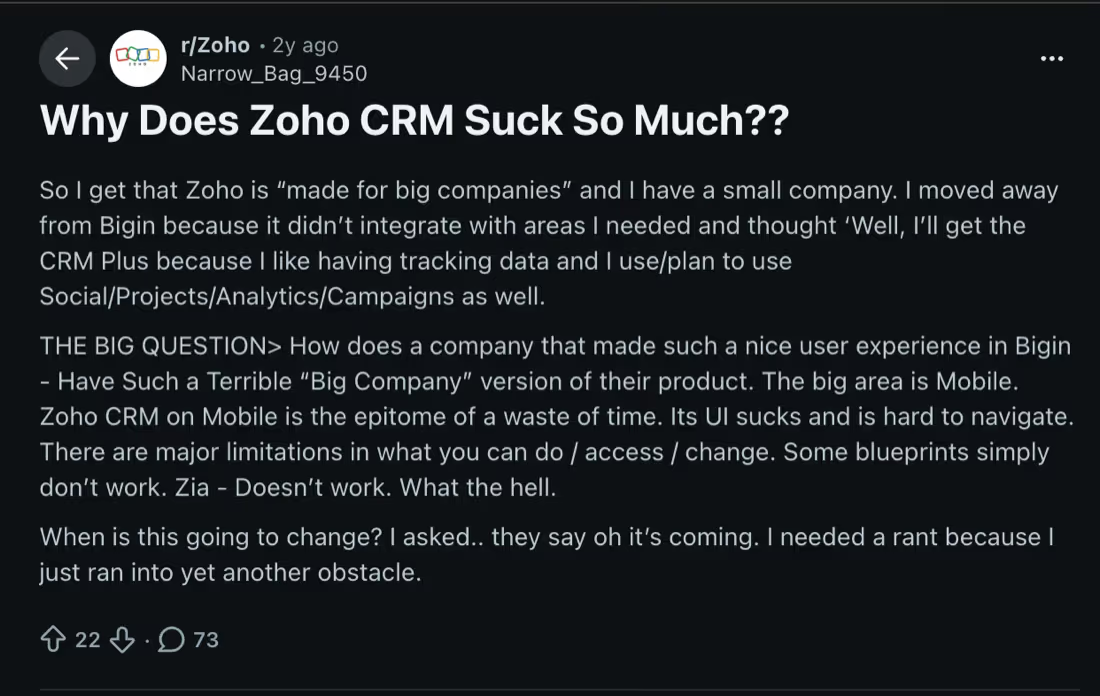
In that r/Zoho thread (22 upvotes, 73 comments), a small-business owner describes upgrading from Bigin to CRM Plus and being disappointed by the jump — singling out the mobile app as hard to navigate and limited in what you can change, with Blueprint and Zia not behaving as expected. Their core point is telling: Zoho built a genuinely pleasant experience in Bigin, so the density of the flagship product feels like a choice rather than a constraint.
A blunter thread on r/sales — "Zoho CRM is the worst CRM I've ever used" — drew 167 upvotes and over 100 comments. The recurring theme in the replies is fragmentation: settings buried several layers deep, and an experience that feels like different teams built different parts without coordinating. The original poster had come from Capsule and would have preferred HubSpot, but inherited Zoho because their company already used it for accounting — which is exactly how a lot of teams end up on it.
Balance matters here. Reddit self-selects for frustration; people rarely post to say their CRM worked fine. On review platforms the aggregate picture is much warmer — Capterra shows roughly 4.3/5 across several thousand reviews, and G2 and TrustRadius land in similar territory, with praise clustering on value, customization and pipeline management.
Read together, the two sources tell one consistent story, and it's the same conclusion we reached: Zoho's economics and flexibility are excellent; its day-to-day experience is its weak point. Go in expecting to invest in setup and training, and the complaints above are survivable. Expect it to feel like HubSpot on day one and you'll be disappointed.
Zoho CRM vs the alternatives
- Zoho CRM vs HubSpot — the key decision for most buyers. HubSpot wins on usability, free tier and marketing automation; Zoho wins decisively on price and customization.
- Pipedrive — simpler and more pleasant for pure pipeline management, but far less customizable and without a comparable suite.
- Salesforce — more powerful and extensible at the top end, at a cost and complexity most SMBs don't need.
- Attio / folk — modern, cleaner CRMs for startups that value speed over depth.
Weighing options? See our best CRM for startups guide, or how to choose a CRM if you're earlier in the process.
Final verdict: is Zoho CRM worth it?
Yes — if you buy it for the right reason. Zoho CRM is the strongest value proposition in the category. You get customization, automation and reporting that genuinely compete with platforms costing several times more, plus a suite that can run most of a business.
You pay for that in experience, not money: a denser interface, a slower start, and support that can frustrate. If your team is willing to invest a week in setup, the savings compound for years. If you need something everyone loves from the first login, pay the premium for HubSpot instead.
Rating: 4.3/5 — outstanding value and flexibility, held back by usability.
Frequently asked questions
Is Zoho CRM good?
Yes. Zoho CRM is a capable, deeply customizable CRM that offers exceptional value — comparable functionality to platforms costing far more. Its weaknesses are usability and support rather than capability, so it suits teams willing to invest in setup.
How much does Zoho CRM cost?
Zoho CRM has a free plan for up to three users. Paid plans run roughly $14/user/month (Standard), $23 (Professional), $40 (Enterprise) and $52 (Ultimate) when billed annually. Most teams choose Professional or Enterprise, since the deepest customization sits on Enterprise.
Is Zoho CRM better than HubSpot?
Neither is universally better. Zoho CRM wins clearly on price and customization; HubSpot wins on ease of use, its free plan and marketing automation. Choose Zoho if budget and flexibility matter most, HubSpot if adoption and marketing matter most. See our full comparison.
Is Zoho CRM free?
Zoho CRM has a genuinely free plan supporting up to three users with core lead, contact and deal management. It's enough for a solo founder or very small team, but you'll need a paid plan for automation, deeper customization and a larger team.
Is Zoho CRM hard to learn?
It has a steeper learning curve than HubSpot or Pipedrive. The interface is dense and much of the power sits behind configuration. Most teams need a few days of setup and some training before it feels comfortable — plan for that rather than expecting instant productivity.
What is Zoho CRM best used for?
It's best for small and mid-sized businesses that want strong CRM capability at a low price, and for teams whose sales process needs custom modules, fields and workflows rather than standard defaults. It's especially compelling if you adopt other Zoho apps.
Comparing options? Read Zoho CRM vs HubSpot, browse the best CRM for startups, or start with how to choose a CRM.