Quick answer — Pick the CRM that fits your sales motion, not the one with the longest feature list. Start with three questions: how do deals actually come in, how many people need to touch a deal, and where does your customer data already live? Match those to a tool, then sanity-check the pricing model and how painful it'll be to leave. Most small teams are best served by a simple, affordable CRM (Pipedrive, Attio, HubSpot's free tier) and grow into more only when a real bottleneck appears — not before.
A CRM is one of those tools you'll live in every day and hate to switch later, so the cost of choosing wrong is high. The good news: you can get this right without a two-month evaluation. Here's the framework we use.
Start with your sales motion, not the feature list
Every CRM demo looks impressive. The question isn't "what can it do" — it's "does it fit how you actually sell." Answer these first:
- How do deals come in? Inbound (form fills, signups) rewards automation and lead routing. Outbound (cold email, calls) rewards sequencing and activity tracking. Relationship-led (referrals, partnerships) rewards a clean contact graph over heavy pipelines.
- How many people touch a deal? A solo founder needs a fast, quiet contact tracker. A five-person sales team needs assignment, permissions, and shared visibility.
- What are you actually tracking? B2B deals with stages and forecasts are a different tool from high-volume B2C support-style relationships.
Write your answer in one sentence — "we're a two-person team closing inbound B2B deals from demo requests" — and every feature decision gets easier.
What real buyers say
We're not the only ones who land on this framework. The same advice comes up repeatedly from people who've actually run CRM selections — and it's worth reading them rather than taking our word for it.
A thread on r/CRM captures the starting position almost perfectly:
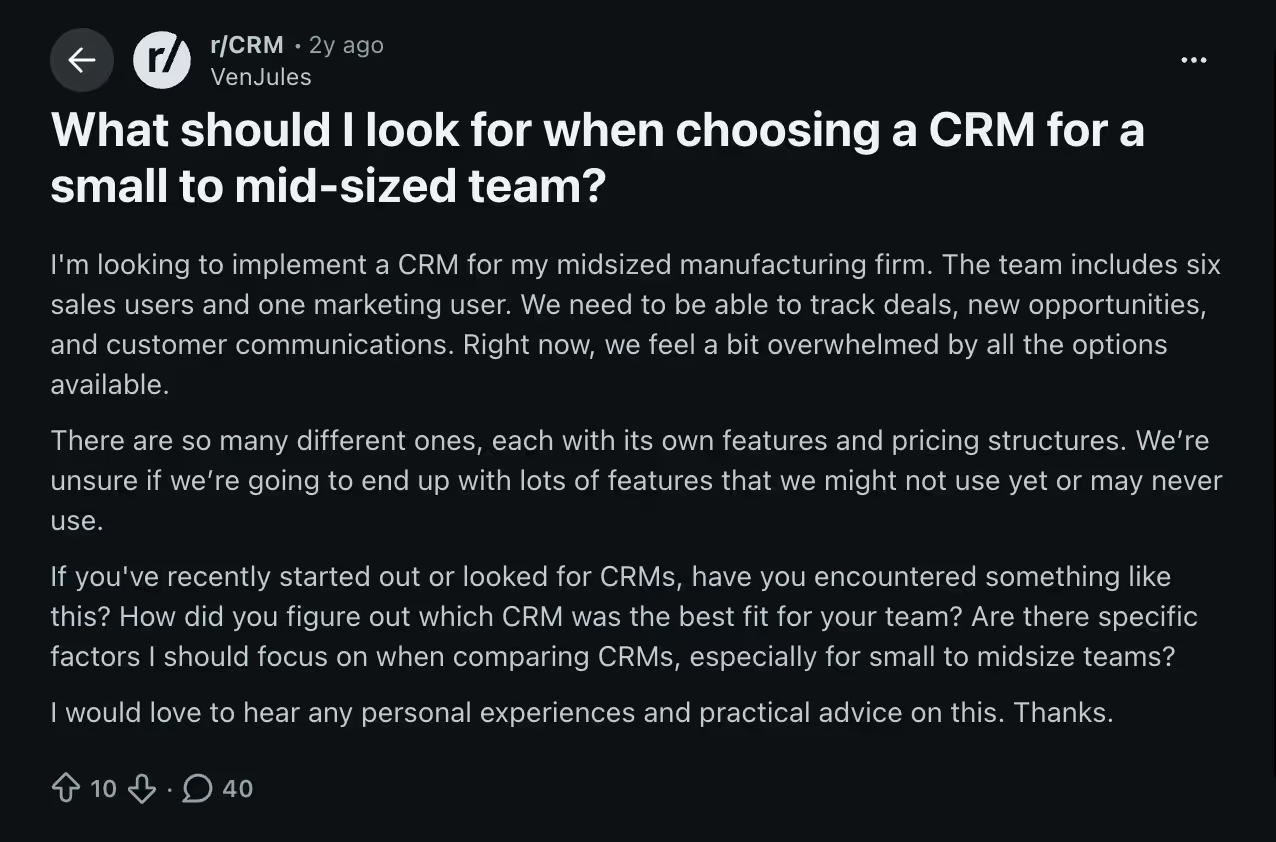
The poster runs a midsized manufacturing firm with six sales users and one marketing user. They need to track deals, opportunities and customer communications — and they're stuck for a very specific reason: "we're unsure if we're going to end up with lots of features that we might not use yet or may never use." That's the fear that makes people over-research CRM and still choose badly.
The replies are where it gets useful:
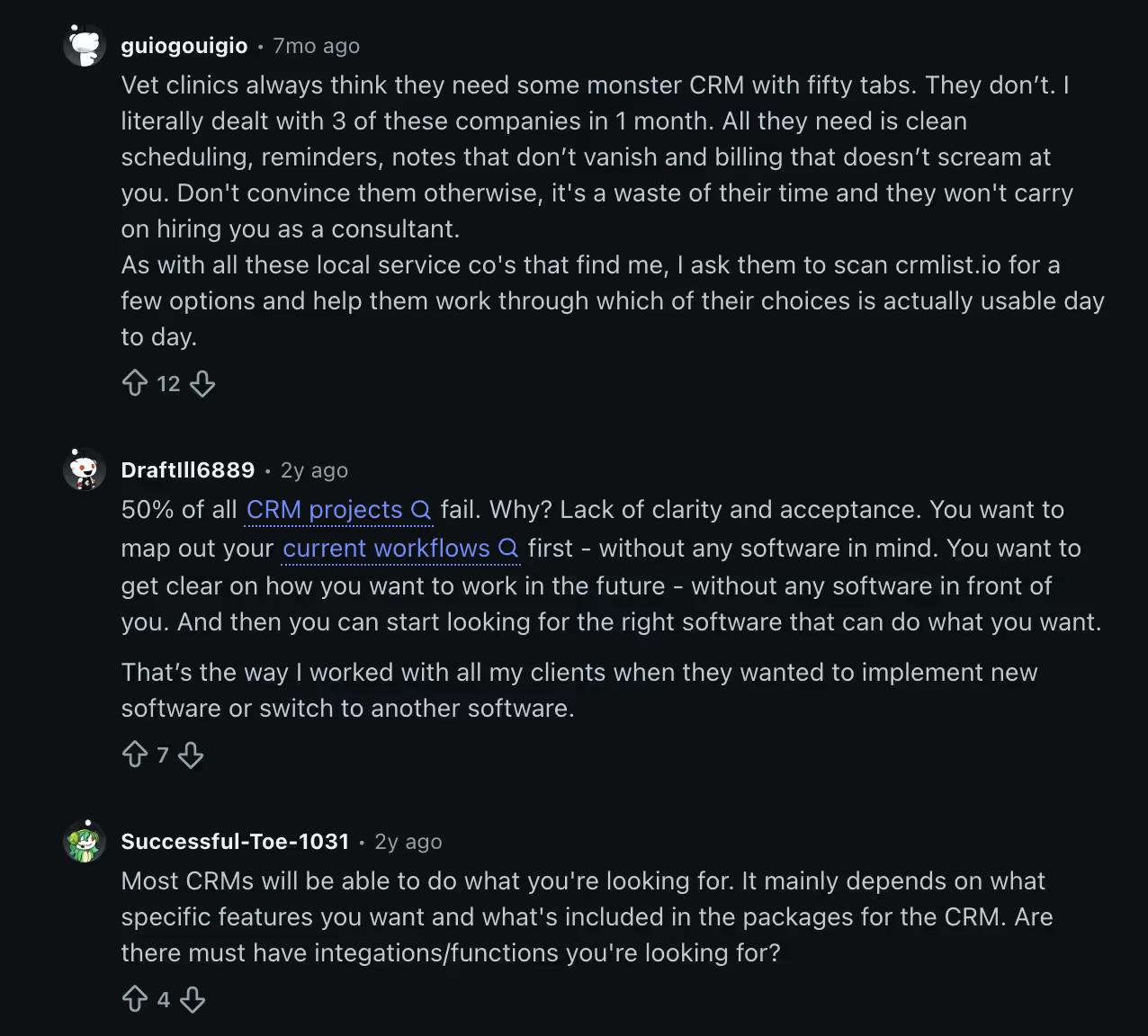
Three themes come up, and all three match what we found:
- Map your workflow before you look at software. One consultant's advice is to map out how you work now, and how you want to work, without any software in front of you — and only then start looking. They attribute CRM project failures to "lack of clarity and acceptance" rather than picking the wrong vendor. (They cite a 50% failure rate; that figure gets quoted a lot in the CRM industry and is hard to verify, so treat it as directional rather than precise.)
- Most teams over-spec badly. Another consultant, who works with local service businesses, puts it bluntly: clients think they need "some monster CRM with fifty tabs" when what they actually need is clean scheduling, reminders, notes that don't vanish, and billing that isn't painful. Buying for imagined future needs is the most common and most expensive mistake.
- Capability is rarely the differentiator. As one reply notes, most CRMs can do what you're asking for — the real question is which specific features and integrations are genuinely must-have for you. That's exactly why a feature-list comparison is the wrong starting point.
A caveat worth stating: these are individual practitioners on a public forum, not a survey. They're useful because they're specific and unsponsored, not because they're statistically representative — and consultants naturally favour advice that involves hiring a consultant. Read them as experienced opinion that happens to converge, which is roughly how much weight they deserve.
The convergence is the point. Independent practitioners, our own testing and the buyers themselves all arrive at the same conclusion: define the workflow first, then shop. Everything below assumes you've done that.
Understand the pricing model before the price
The sticker price is rarely what you pay. CRMs get expensive in predictable ways:
- Per-seat pricing scales with your team. Cheap at 2 people, painful at 20. Check the price at the size you'll be in a year, not today.
- Contact- or record-based tiers can jump sharply as your database grows — common with marketing-heavy CRMs.
- Add-ons and gating. The demo features (automation, reporting, email sync, enrichment) often live in a higher tier or a paid add-on. Confirm the plan that has what you need, then price that.
A CRM that's free today but forces a 5× jump the moment you add automation may be more expensive than a flat-rate tool over two years.
Match the CRM type to your stage
| If you are… | Prioritize | Reasonable picks to compare |
|---|---|---|
| A solo founder / very small team | Speed, low price, a clean contact list | Attio, Pipedrive, HubSpot (free) |
| A growing sales team | Pipeline stages, assignment, reporting | Pipedrive, HubSpot, Close |
| Marketing + sales together | Native email/automation in the CRM | HubSpot, ActiveCampaign |
| A large or complex org | Deep customization, permissions, integrations | Salesforce, HubSpot Enterprise |
This is a starting shortlist, not a ranking — see our best CRM for startups guide for the tested, priced breakdown.
Features that actually matter (and ones that don't yet)
Focus your evaluation on the few things that make or break daily use:
- Contact and deal management that's genuinely fast to update. If logging an interaction takes more than a couple of clicks, your team won't do it — and a CRM nobody updates is worthless.
- Email integration (two-way sync with Gmail/Outlook) so conversations land against the right contact automatically.
- Pipeline visibility — can you see, at a glance, what's stuck and what's closing this month.
- Reporting you'll actually read. A simple pipeline and activity report beats a dashboard builder you'll never open.
Nice-to-haves you can usually defer: AI features, advanced forecasting, custom objects, and deep automation. They matter later; they shouldn't drive the initial choice.
Integrations and where your data lives
A CRM is the hub, so it has to connect to the tools around it:
- Native integrations with your email, calendar, and (if relevant) your store, support desk, or product analytics.
- A real API or Zapier/Make support so you're not stuck when you add a tool.
- Clean import/export. You should be able to get your data out as easily as in — that's both a portability and a trust signal.
If your customer data currently lives in a spreadsheet or Notion, the migration path into a proper CRM should be an early question, not an afterthought.
Don't ignore the switching cost
Getting into a CRM is easy; leaving is not. Before you commit:
- Exporting contacts is simple — but rebuilding automations, custom fields, and reports in a new tool is not.
- Preserving history and engagement data across a migration is where teams lose the most.
Factor switching cost into the first decision. Pick a tool you won't outgrow within a year, and confirm it exports cleanly if you ever do.
A 7-point checklist before you commit
- Can you describe your sales motion in one sentence — and does this CRM fit it?
- What does the plan you actually need cost at next year's team size?
- Are the must-have features on that plan, or gated above it?
- Does it sync natively with your email and calendar?
- Does it integrate with your other core tools (or offer a real API)?
- Can you export all your data cleanly?
- Can a teammate log a deal update in under 10 seconds?
If you can answer all seven, you're ready to choose.
Frequently asked questions
What is the best CRM for a small business or startup?
For most small teams, a simple, affordable CRM like Pipedrive or Attio — or HubSpot's free tier — covers what you need without overpaying. The "best" one depends on your sales motion: outbound teams value sequencing, inbound teams value automation and routing. See our best CRM for startups guide for tested picks with pricing.
How much should a CRM cost?
Entry CRMs run roughly $10–$30 per user per month; more complete sales-and-marketing platforms cost more, and enterprise tools like Salesforce can run much higher once add-ons are included. Price the specific plan that has the features you need at the team size you'll be in a year — not the headline starting price.
Can I use Notion or a spreadsheet as a CRM?
For a solo founder with a handful of contacts, yes — it's a fine, free way to start. But it breaks down fast without email sync, automation, or pipeline reporting. We cover exactly where it falls apart in 5 reasons not to use Notion as your CRM.
What's the most important CRM feature?
Fast, frictionless data entry. A CRM only works if your team actually updates it, so if logging a contact or deal is slow, nothing else matters. After that, prioritize two-way email sync and clear pipeline visibility.
How do I switch CRMs without losing data?
Export your contacts and deals first (every reputable CRM supports this), then rebuild automations, custom fields, and reports in the new tool — that's the real work, not the contact import. Preserve engagement history where you can, and plan the migration before you commit rather than after.
Ready to compare specific tools? See the best CRM for startups — ranked, priced and tested — or browse the open-source directory for self-hostable options.