

If your website looks perfect in Chrome browser, that does not necessarily mean search engines can see everything as you expect them to see.
A page can have beautiful layouts, interactive components, animations, dynamically loaded content, and JavaScript-powered navigation while the initial HTML delivered to a crawler contains very little useful information.
That's where a tool like Googlebot simulator or search engine crawler simulator can help you. Instead of looking at your website like a human visitor, a crawler simulator lets you inspect the HTML and SEO elements available to a search-engine crawler.
In this guide, you'll learn what a Googlebot simulator does, what to check, why JavaScript can matter for SEO, and how to use a crawler simulation to troubleshoot indexing and on-page SEO problems.
What Is a Googlebot Simulator?
A Googlebot simulator is an SEO tool that helps you understand and find what Google's crawler may encounter when it requests a web page. Googlebot is Google's web crawler. It discovers URLs, fetches pages, processes their content, and contributes to Google's indexing systems.
A simulator does not reproduce Google's entire ranking or indexing system. Instead, it provides a practical way to inspect the HTML and page elements that a crawler can receive.
A useful crawler simulator can help you inspect:
- Page title
- Meta description
- H1, H2 and H3 headings
- Page text
- Internal links
- External links
- Anchor text
- Image alt text
- Image filenames
- URLs
- Keyword occurrences
- Raw HTML
This is particularly useful when a website relies heavily on JavaScript or dynamically generated content.
Why Should You Simulate Googlebot?
One of the biggest SEO mistakes is assuming that "what I see in my browser" is exactly the same as "what a crawler receives." It isn't always.
Your browser can execute JavaScript, load additional resources, render components, retrieve data from APIs, and display a fully interactive page. The initial HTML response can be much simpler.
For example, imagine your article contains this important text: Best accounting software for startups. But the text is inserted into the page only after a JavaScript application loads. A browser may eventually display it. A crawler inspection tool can help you determine whether that content exists in the initial HTML and whether important SEO elements are present where you expect them. This makes a search engine crawler simulator useful for technical SEO debugging.
Googlebot Simulator vs. Normal Browser
The easy way to understand the difference is to think about two different perspectives.
| Browser | Crawler inspection |
|---|---|
| Renders the visual page | Examines crawler-accessible HTML |
| Executes JavaScript | Can inspect initial server response |
| Loads CSS and visual elements | Focuses on crawlable content and elements |
| Shows interactive components | Helps identify missing HTML content |
| Optimized for human visitors | Optimized for SEO troubleshooting |
This does not mean Google ignores JavaScript. Google can render JavaScript. The important point is that JavaScript-dependent pages deserve additional testing because content and links that are unavailable or problematic during crawling can create SEO issues. A simulator gives you another diagnostic view of the page.
What Does a Search Engine Crawler Simulator Check?
A useful search engine simulator should go beyond simply displaying the page source. Here are the most important elements to inspect.
Your title tag tells search engines and users what a page is about. A crawler simulator can help you verify that the title exists in the HTML and contains the topic you intended to target. Keep titles descriptive and focused rather than stuffing them with repeated keywords.
A meta description does not guarantee a higher ranking, but it can influence how your search result is presented and can help communicate the value of the page to searchers. Check that your important pages have unique descriptions that accurately summarize their content. A crawler simulator can quickly reveal pages where the meta description is missing or unexpectedly generated.
Headings help organize your content. A crawler inspection can show whether your page contains one clear primary heading, descriptive H2 sections, logical H3 subsections, relevant terminology, and whether there are duplicate or empty headings. This creates a much clearer topical structure than pages where headings are used only for visual styling.
One of the most useful things a Google crawl simulator can reveal is the actual text available to the crawler. This is especially important for websites built using modern JavaScript frameworks. Ask:
Internal links help users and search engines discover related pages. A crawler simulator can show internal URLs, anchor text, external links, navigation links and contextual links. Your crawler inspection should help you understand whether important pages are actually connected through crawlable links.
Images are another useful area to inspect. For meaningful images, check whether your HTML contains useful alt text. Do not add keywords to decorative images simply for SEO. Alt text should primarily describe meaningful images and support accessibility.
Your URLs should be easy for users and search engines to understand. A crawler simulator can also help identify where links point and whether important pages are using clean, descriptive URLs.
Googlebot Simulator and JavaScript SEO
JavaScript is one of the biggest reasons to inspect your HTML rather than relying only on the visual page. Consider a simple example. Your browser sees "Best Email Marketing Software", but the server initially returns an empty `<div id="app"></div>`. The application then loads JavaScript and inserts the actual content.
Compare the best email marketing platforms — pricing, automation, deliverability and free plans.
<div id="app"></div>
<!-- content inserted by JavaScript after load -->
</body>
That does not automatically mean Google cannot index the page. However, it gives you a reason to investigate how your content is delivered, rendered, and discovered. A crawler simulator provides a quick first check.
If important content is missing from the HTML you inspect, investigate further using Google Search Console, URL Inspection, rendered HTML, server-side rendering, JavaScript rendering, robots directives, canonical tags and internal links. The simulator should be treated as a diagnostic tool, not as a replacement for Google's own testing systems.
How to Use a Googlebot Simulator
You can perform a basic crawler inspection in a few steps.
Googlebot Simulator vs. Google Search Console
These tools serve different purposes. Google Search Console tells you what Google knows about your website and provides information about indexing, search performance, and specific URLs. A Googlebot simulator provides a simple way to inspect the page's crawler-facing HTML and SEO elements. Use both.
For example, if your page is not ranking — in Search Console, check indexing status, queries, impressions, clicks, and URL inspection; in a crawler simulator, check title, headings, links, content, and HTML; and in a page audit, check technical SEO and content quality. Together, these give you a much stronger debugging workflow than relying on one tool.
Googlebot Simulator vs. SERP Simulator
These two tools are often confused. They solve different problems.
A Googlebot / search engine crawler simulator answers: What can a crawler see on my page? It focuses on HTML, content, links, headings, metadata, images, and crawlable elements.
A SERP simulator answers: How might my search result look to a user? It focuses on the search-result snippet, including title, description, URL and other simulated SERP elements.
You can use both before publishing an important page. The crawler test checks whether the page is technically understandable; the SERP preview checks whether the search result is compelling. Here's how the same page can look in Google — toggle between a weak listing and an optimized one:
 Your Store
https://yourstore.com › page?id=8392
Your Storehttps://yourstore.com › guides › best-crm-for-startups
10 Things to Check Before Publishing an SEO Page
Use this quick checklist before publishing.
Common Googlebot Simulator Mistakes
Mistake 1: Treating the simulator as Google
Mistake 2: Obsessing over keyword density
Mistake 3: Adding keywords everywhere
Mistake 4: Ignoring internal linking
Mistake 5: Assuming JavaScript is automatically bad
A Practical SEO Workflow
If you are publishing content regularly, use this workflow.
Before publishing:
- Research the search intent — understand what users actually want to search.
- Build the page — create useful, original content that satisfies that intent and gives a useful answer.
- Inspect the HTML — use a crawler simulator to check what is available to a crawler.
- Review the search snippet — use a SERP preview tool to check your title and description.
- Add internal links — connect the page to relevant content across your website.
After publishing:
- Submit or inspect the URL — use Google Search Console where appropriate.
- Monitor impressions — look for new queries and changes in search visibility.
- Improve the page — update titles, content, internal links and sections based on real search performance.
Try the Free Search Engine Simulator
If you want to see how your page looks from a crawler's perspective, you can run a free simulation with ChooseMyStack. Open the Search Engine Simulator →
Enter a public URL and inspect the page's title, meta description, headings, keywords, internal links, external links, page text, image alt text and HTML.
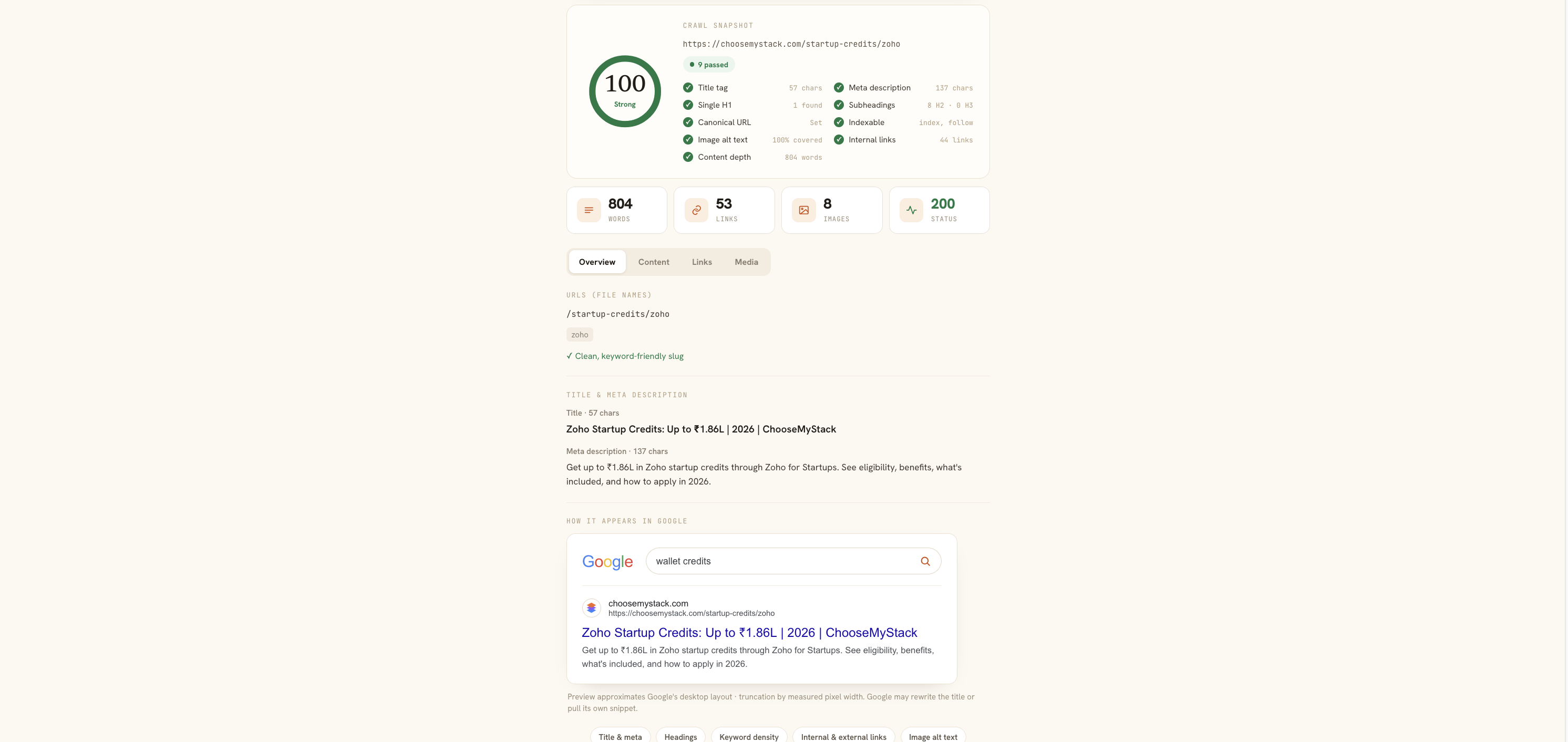
It is particularly useful when you're troubleshooting pages that rely heavily on JavaScript or when the content you see in a browser does not seem to match what is available in the page source.
Final Takeaway
You don't need to guess what search engines can see. A Googlebot simulator gives you another practical way to inspect the HTML behind a webpage and identify potential SEO problems involving content, headings, links, metadata and JavaScript. Use it alongside Google Search Console, technical SEO audits and SERP previews.
The goal isn't to "trick" Google. The goal is simple: make your important content easy for search engines to discover, understand and index — and make the resulting search listing compelling enough for people to click.
